
What makes a portable projector? That’s the question I’ve been asking myself for the past two weeks that I’ve used XGIMI’s latest product, the MoGo 2 Pro. On the other hand, the projector is brighter than its predecessor, has much better built-in audio, and is easier to set up and use. While these are all noteworthy additions, XGIMI removed the internal battery from the MoGo 2 Pro, so it needs an external power source to operate.
This is a limitation since the first generation MoGo Pro had a built-in battery that provided up to 2 hours of use without any external power. To use the MoGo 2 Pro in a portable setup, you’ll need to bring along a 65W power bank. While this makes the projector less versatile than its predecessor, the upgrades on offer make the MoGo 2 Pro a great projector you can take anywhere.
XGIMI MoGo 2 Pro: Pricing and Availability

XGIMI unveiled the MoGo 2 Pro on March 30, and the projector is now up for pre-order on the brand’s website. MoGo 2 Pro retails for $599 but is currently available for $549 (Opens in a new tab)and XGIMI is also rolling out a standard variant called the MoGo 2 that retails for $399 and can be had for $349 right now.
The MoGo 2 Pro is a 1080p projector, and the MoGo 2 offers a 720p display. The Pro model has better keystone correction, but other than that and the higher resolution, the hardware is identical on both variants.
XGIMI MoGo 2 Pro: Design and Features

I’ve always loved XGIMI’s design aesthetic, and this is no different with the MoGo 2 Pro. It features the same brushed aluminum design as the larger Horizon Pro 4K projector, and the gray color scheme makes it look premium. Coming in at 1.1kg, it is portable in nature, you can throw it in the bag and carry it anywhere. I would have liked to have seen a carrying case bundled in the package to protect the lens, but it’s not a big deal.
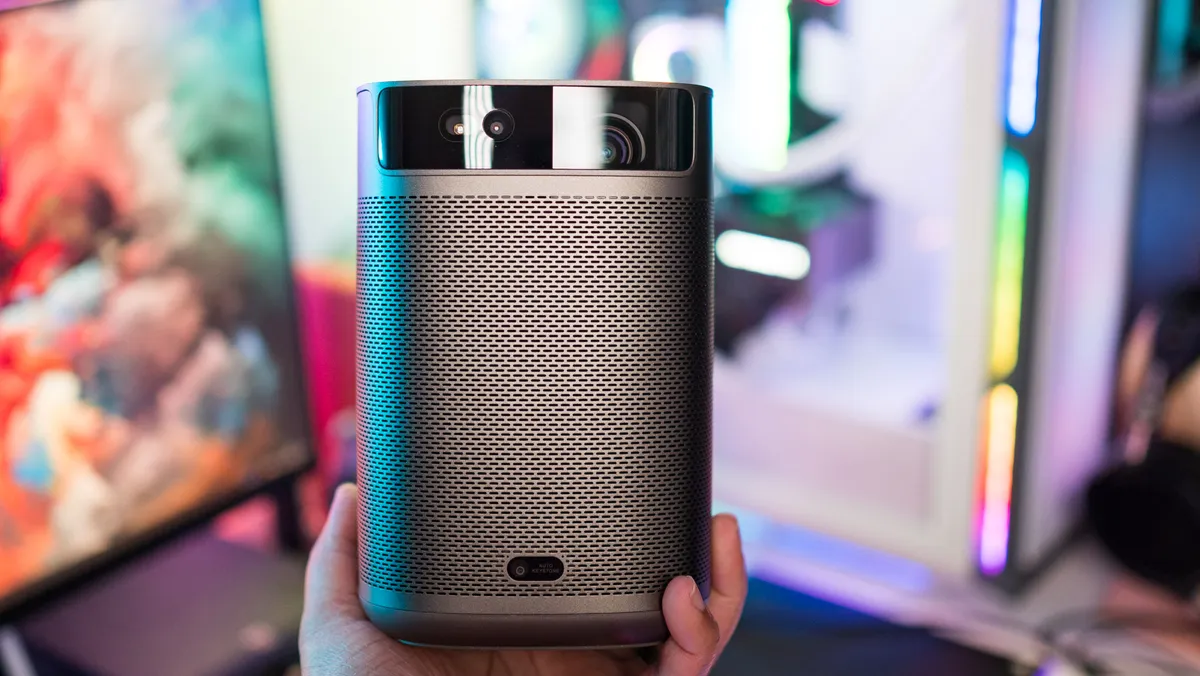
The MoGo 2 Pro is heavier than its predecessor despite missing an internal battery, thanks to its larger built-in audio drivers. The projector has dual 8W drivers this time around, and there’s a clear window on the back that highlights the passive radiator. The drivers are located on either side of the projector, and provide a balanced sound.
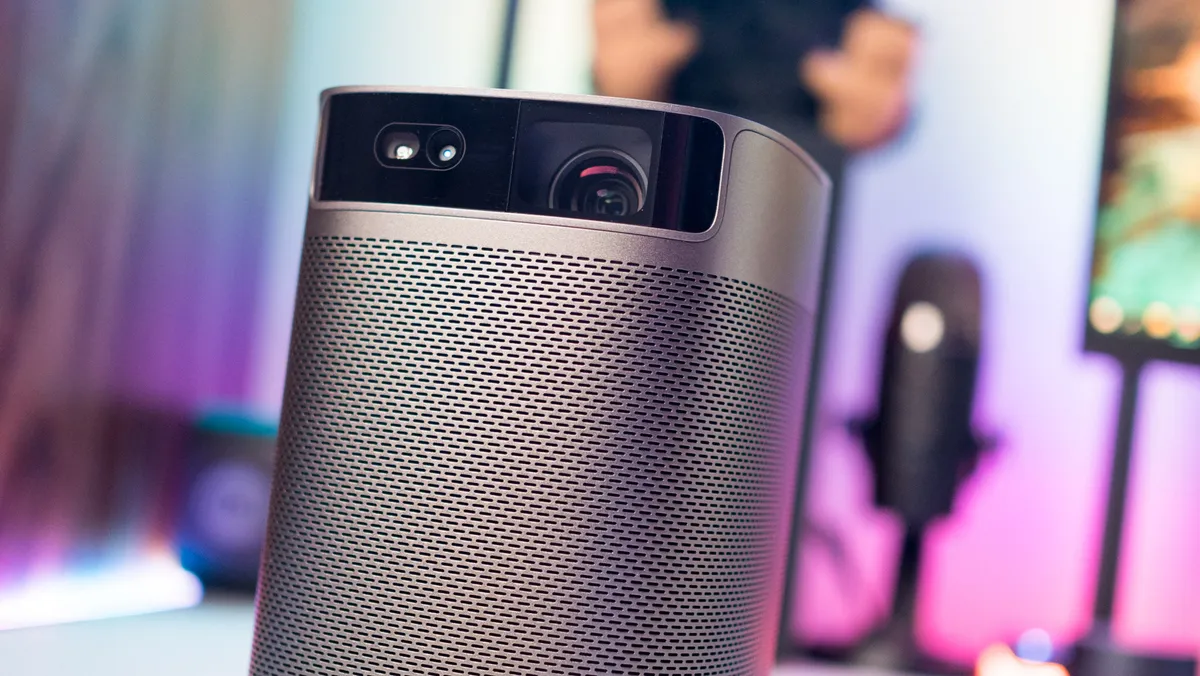
The lens is located at the front, and you’ll find a CMOS camera and a new 3D ToF sensor that facilitates autofocus and auto keystone correction. XGIMI calls this ISA 2.0, and it’s the biggest differentiator for the MoGo 2 Pro. This feature makes setting up the projector anywhere easy, and it works flawlessly. One big issue with most portable projectors is setting them up for outdoor use, and with auto focus and auto keystone correction, it takes no time to set up the MoGo 2 Pro on almost any surface.
picture 1 to 4

The MoGo 2 Pro’s vented design allows for good airflow, and there’s a fan on the back that turns on when the projector is active. On the hardware side, you’ll find 2GB of RAM and 16GB of internal storage, and there’s Wi-Fi ac along with Bluetooth 5.0. There is a standard mounting thread on the base that lets you mount the MoGo 2 Pro on a stand, but it stays put on any flat surface as well.

Around the back, you’ll find an HDMI 2.0 port with ARC, a USB 2.0 port, a 3.5mm jack, and a USB-C port for power. Previous models in the XGIMI portable range featured a DC connector, but with the MoGo 2 Pro needing an external source, the brand has switched to USB-C. The projector requires 65 watts of power, and you can use any of the best power banks available today to power the device.

I’ve used a MoGo 2 Pro with a 100W Chargeeek Storm 2 and had absolutely no problems, but the projector automatically switches to eco mode when connected to a power bank. This mode conserves energy by reducing brightness and volume levels, and fortunately, you can disable the mode. I did it immediately after setting it up, and the MoGo 2 Pro worked well on a power bank, drawing just over 50W on average.

The only quibble I have with the design has to do with the onboard controls, or lack thereof. You’ll find the power button on the top of the MoGo 2 Pro, and that’s about it. I would have liked to have seen the volume and playback controls right on the device, but that’s not the case. However, the bundled bluetooth remote is great, and it pairs without any issues.
Overall, the MoGo 2 Pro doesn’t differ much in the area of design, but it still manages to look stylish, and it’s quite portable.
XGIMI MoGo 2 Pro: picture and sound quality

Image quality is the area where there is the biggest difference, and while 400 nits might not sound like much, the MoGo 2 Pro does a great job in this area. Don’t get me wrong; Colors will look washed out during daytime use or if there is a lot of ambient light, but in a relatively dark room the projector comes into its own.
It gets more than bright enough, and colors look vibrant and detailed. There are four picture modes offered—Movie, News, Music, and Sports—and in my use, I’ve found the movie mode to have the best color vibrancy. The MoGo 2 Pro uses the same 1.2:1 projection ratio as the more expensive Halo+, and has HDR10. It has a resolution of 1920 x 1080, but works with 4K sources like the NVIDIA Shield TV.
picture 1 to 3
But the biggest reveal was the sound on board. With its dual 8W drivers, the MoGo 2 Pro generates enough sound to fill an average-sized room, and is perfect for on-the-go use. XGIMI has done a great job in this area, and the built-in audio means you don’t have to connect an external audio device to the MoGo 2 Pro.
XGIMI MoGo 2 Pro: software

The MoGo 2 Pro runs Google TV based on Android 11 out of the box, and as I mentioned before, I’m not a fan of the interface. It’s full of ads and doesn’t provide helpful recommendations, and I’d have liked to see Android TV instead. However, you do get full access to the Play Store, and in my usage, it was relatively smooth. The device shown means there is an occasional delay when switching between streaming services, but it’s not annoying.

One big criticism of the brand’s projectors in the past has been the lack of Netflix integration; This wasn’t something XGIMI could control, and even today, the likes of the Aura 4K ultra-short-throw projector don’t have streaming service. Fortunately, XGIMI has found a workaround to install Netflix on MoGo 2 Pro. You’ll find a leaflet detailing the instructions in the box, and it basically involves downloading Netflix to the device.
This method actually works, and while you miss out on HDR content, the fact that you can stream Netflix on an XGIMI projector solves a huge problem. Other features include Chromecast integration – giving you the ability to cast content from your phone – and you can use the MoGo 2 Pro as a Bluetooth speaker by pairing with your phone and turning off the screen.
XGIMI MoGo 2 Pro: The competition

While the MoGo 2 Pro has a lot to offer, it’s pricey at $549, and if you’re in the market for value, you should take a look at the first generation MoGo Pro. This projector is now down to just $299, and while it doesn’t shine as bright as the MoGo 2 Pro, it’s a much better deal. The 6W sound onboard isn’t as detailed either, and you miss out on quick automatic keystone correction, but you do get a built-in battery that lasts up to two hours, and at just over half the price, it’s excellent. value.
If you want the brightest picture XGIMI has to offer in its mobile portfolio, you’ll want to consider Halo+. I’ve used the projector for several weeks in the past year, and overall it’s a great product. Up to 900 lumens, automatic keystone correction, built-in 10-watt audio, and a large built-in battery that lasts just over 2.5 hours. It’s available for $719 on Amazon right now, and for what you get, it’s an amazing deal.
XGIMI MoGo 2 Pro: Should you buy it?

You should buy this if:
- You want a portable projector that lights up
- You are looking forward to streaming HDR content on the go
- You want a detailed sound on board
- You need a projector that’s easy to set up and use
- You want Google TV
You should not buy this if:
- You want a portable projector with a built-in battery
While I was initially unsure about the MoGo 2 Pro due to the lack of an internal battery, the display ticks all the right boxes. For one thing, it sounds a lot better than I ever thought possible, and XGIMI’s decision to go with larger audio drivers instead of an internal battery proved the right choice.
XGIMI has also threaded the needle when it comes to brightness levels. At 400 lumens, the MoGo 2 Pro is brighter than its predecessor—which makes it more versatile—but still not great for use during the day or in situations where there’s a lot of ambient light. If you need a portable projector that lights up, you’ll need to pay more and get the Halo+, which clocks in at 900 lumens.
The best part is that with autofocus and automatic keystone correction, setting up and using the MoGo 2 Pro is as easy as can be, making it one of the best portable projectors around. I’m also glad there’s finally a usable workaround for Netflix — a long-standing problem for the brand.
If you want a portable projector that you can take anywhere with you with good brightness levels and excellent sound, there is no better option in this category than the MoGo 2 Pro.